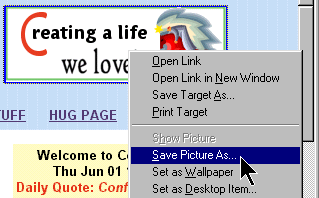
- RIGHT click on the picture or background that you want to save.
- When a menu appears, LEFT click on Save Picture As or Save background as.
- A Save Picture window will open so that you can tell your computer where it's supposed to store the picture (the computer will think of the picture as a file).
- Look at the small text box next to the words "Save in"
- Click the down arrow on right side of box
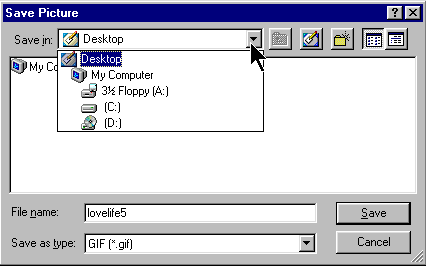
- To save the file to computer's filing system, click on the [C:] drive. It's list of folders will appear below.
Find the folder where you would like to save the picture. Make sure that you double click on it to make it appear in the Save in box
- NOTE: To save the picture to a floppy disk instead, select 3 ½" Floppy [A:] This will tell your computer that you want the picture saved on the disk you have inserted in the disk drive.
- Next look at the bottom part of the window and locate File name: and the box next to it.
- You can keep the name listed in the box or give the picture another name by putting the cursor bar in the box and typing in a new name.
- Click on the word, Save.
|