
"E-mailing is fun and easy once you learn your way around Outlook Express! Check out the window pictured below!"
| Home | Services | Gallery | Tutorials | Games |
|
Flashcard #19: The Outlook Express E-mail Window and Its Parts |
|
|
Susie Tutor says:
"E-mailing is fun and easy once you learn your way around Outlook Express! Check out the window pictured below!" |
|
|
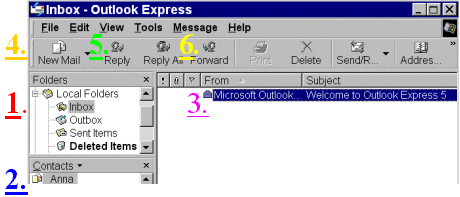
1. Your e-mail program has 4 main folders that you can click on to access: the 'Inbox' for all incoming messages; the 'Outbox', where outgoing messages are kept until they are sent; the 'Sent Items' where a copy of the messages you send are kept; the 'Deleted Items' folder where deleted messages are kept until they are permanently deleted. |
|
2. Your 'Contacts' list provides a quick way to choose someone to e-mail. Just double click on their name and a new mail message box comes up.
|
|
3. Your e-mail message are listed to the right of the screen under the 'From' and 'Subject' columns
|
|
4. Click on the 'New Mail' icon when you want to send an e-mail message to someone.
|
|
5. If you want to reply to a message that you received, first click on the message to highlight it, then click on the Reply icon.
|
|
6. If you want to forward a message that you received, first click on the message to highlight it, then click on the Forward icon.
|
| Back to Flashcard Set #2 Contents | Forward to Card 20 |