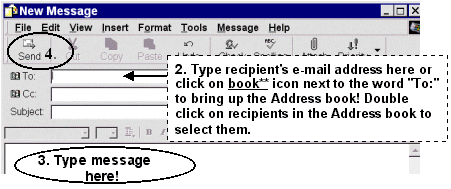
"Unlike regular, 'snail' mail, e-mail is fast! Just choose your recipient, type your message, and click the send button."
| Home | Services | Gallery | Tutorials | Games |
|
Flashcard #20: Sending and Receiving E-mail Messages |
|
Susie Tutor says:
"Unlike regular, 'snail' mail, e-mail is fast! Just choose your recipient, type your message, and click the send button." |
|
To read your e-mail messages, do the following:
|
To send an e-mail message, do the following:
|
| Back to Flashcard Set #2 Contents | Forward to Card 21 |