To customize the Outlook Express window:
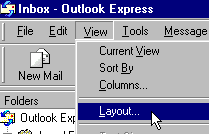
- Click on the word, View, on the menu bar.
- Next, click on Layout.
- When the Layout Properties window opens, chose which options you want.
If you want to prevent messages from being opened automatically, make sure that the box next to Use Preview or Show Preview is unchecked.
Note: In later versions of Outlook Express, if you put a check by Contacts, the people in your address book will be listed below your Folder list.
|
Sorting your messages with a quick click:
 When you click on the column headings, From, Subject, and Received that are located above your messages,
Outlook Express will sort your messages by their sender, subject, or the date received (ascending or descending as you toogle back and forth.).
You can also sort your messages by clicking on the word, View, on the menu bar, and then clicking on Sort by.
When you click on the column headings, From, Subject, and Received that are located above your messages,
Outlook Express will sort your messages by their sender, subject, or the date received (ascending or descending as you toogle back and forth.).
You can also sort your messages by clicking on the word, View, on the menu bar, and then clicking on Sort by.
|