
"Customize your Internet Explorer browser with the Options window!"
| Home | | Services | | Gallery | | Tutorials | | Games | | Huggy Zone | | Comments | |
|
Flashcard #25: The Internet Explorer Internet browser and its Options window |
|
|
Susie Tutor says:
"Customize your Internet Explorer browser with the Options window!" |
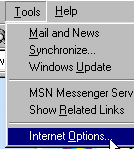 To access the Internet Explorer Options window, click on the word, Tools, on the menu toolbar.
Select the words, Internet Options, from the drop down list.
To access the Internet Explorer Options window, click on the word, Tools, on the menu toolbar.
Select the words, Internet Options, from the drop down list.
|
|
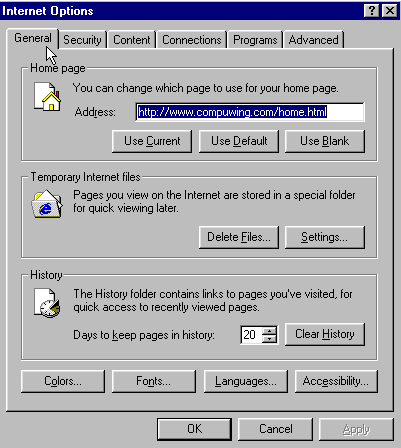
When the Options window opens, notice some of the things you can change on the General tab page. You can change your 'Home page',
which is the page you see whenever you first open your browser. You can also delete your temporary and history files.
Or you can change the font (style of text) on Internet pages that don't define the text style. When you click on other tabs, like the 'Security' tab or 'Advanced' tab, you can read about and select the options you want. NOTE: Make sure you click on the word, Apply, after each change. |
|
| Back to Flashcard Set #2 Contents | Forward to Card 26 |